For Mixergy’s video editor: How to send my interviews to be transcribed by Mechanical Turk
This is part of the behind-the-scenes section of Mixergy, which I call etc.
About this post
This post is aimed at just one person: my video editor.
I’m posting it publicly in case others want to see how I send my interviews to Mechanical Turk to be transcribed (or have suggestions for how I could improve any of this).
Watch me do it (step-by-step details are under the video)
Step 1: open the spreadsheet
The file I use is here (right-click and save it):
https://mixergy.com/wp-content/uploads/mechanical-turk-template.csv

Step 2: delete the extra rows (based on interview length)

Step 3: Input the name of the file we’re having transcribed

Step 4: Save the spreadsheet — make sure to use the CSV format

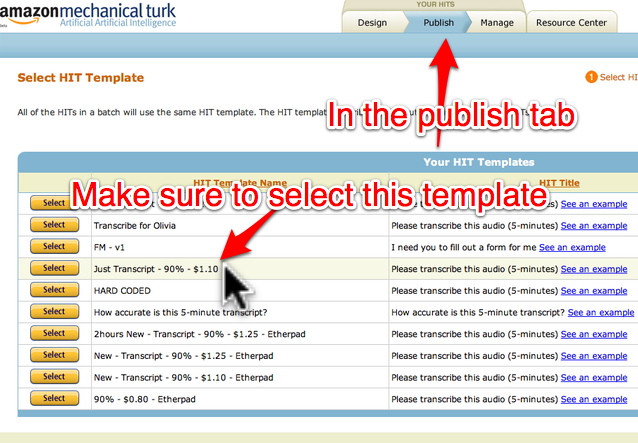
Step 5: On Mechanical Turk’s Publish tab, pick the RIGHT template
Click here to go to this page on Mechanical Turk. (You need my account info.)
Notice that I show which template is the right template. It’s called “Just Transcript – 90% – $1.10
Step 6: Choose the CSV spreadsheet you made

Step 7: Upload the CSV spreadsheet

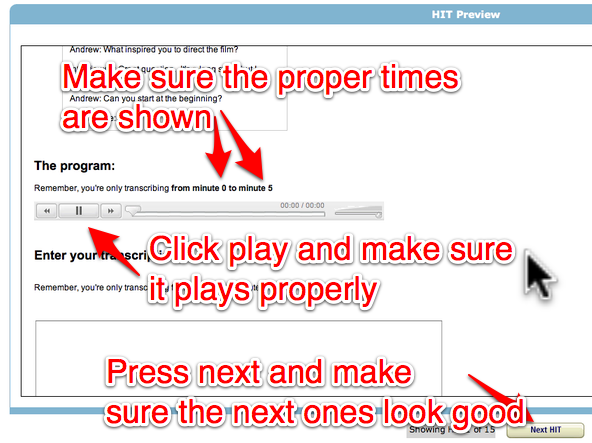
Step 8: Make sure the data is right
Note that on Mechanical Turk the term “HIT” just means “assignment”
What you’re seeing here is what the transcribers see.
Each transcriber only works on a 5-minute section of the transcript.
Make sure the sections you’re giving them look right.
Make sure the audio file plays properly.
Then press “Next HIT” and make sure the next 5-minute assignment looks good.
Step 9: After you tested a few of the assignments, click “next”

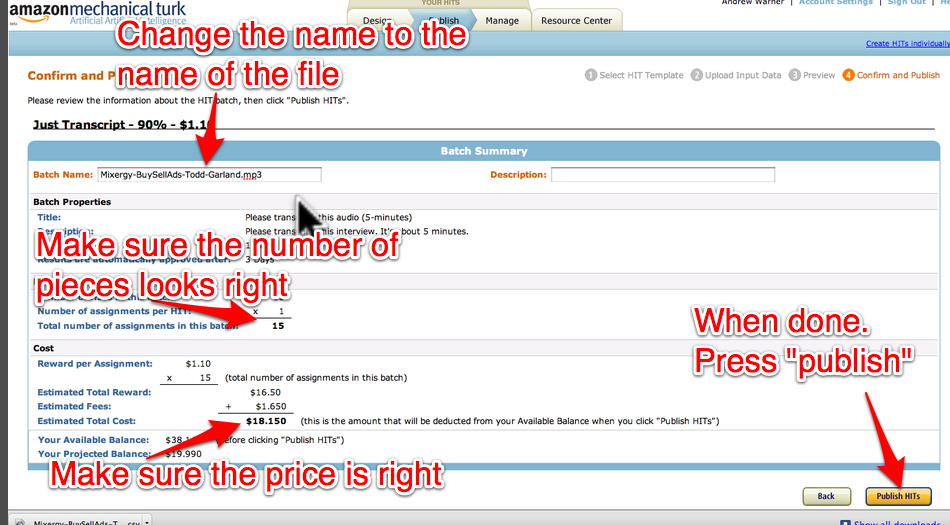
Step 10: Name the work, the press “publish”